Main Line Health Service Request
- PERFORM BIOS UPDATE
- PERFORM A HARD RESET
- A laptop: Disconnect the battery and ac power and hold the power button down for 20 seconds. After, reconnect the battery and attach the ac power adapter, and boot unit.
- A Desktop Mini: Reset remove the power cord from the unit and press the power button down for 30 seconds. Reattach the power cord and see if the unit comes up.
3. If your computer starts up/turns on – RUN A DIAGNOSTICS ON UNIT
- Download Diagnostic
- Search for HP PC Hardware Diagnostics Windows, right-click on the app in the search results, then select “Run as administrator”.

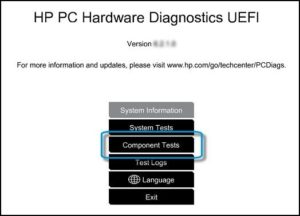
- If your diagnostics ran, please capture the failure ID to submit along with the form below.
Please fill out as much of this form as you can and we will be in touch as soon as possible.